> ## Documentation Index
> Fetch the complete documentation index at: https://docs.insighto.ai/llms.txt
> Use this file to discover all available pages before exploring further.
# Twilio Set Up For Voice ai
Connect your Insighto voice assistant to a Twilio phone number and let users interact via real phone calls.\
This guide will walk you through setting up Twilio, integrating it with Insighto, and deploying your assistant.
> ☁ Ideal for users who want to enable call-based interactions using Twilio.
***
## 📞 Twilio Setup Process
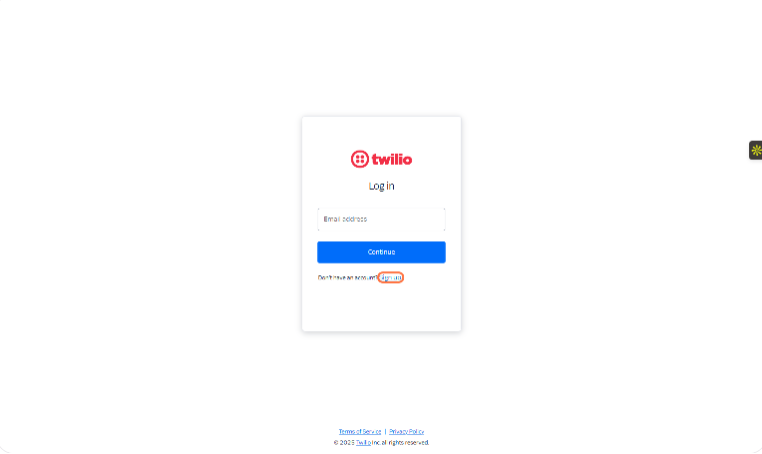
1. Sign Up on Twilio
If you're new to Twilio, click **Sign Up** on the login page to create a new account.
> 🔄 Already have an account? Skip to Step 3.
 ***
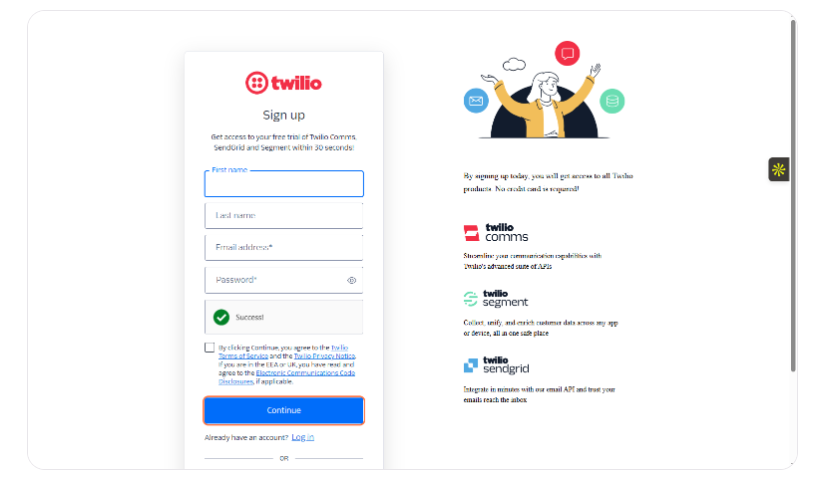
2. Complete the Sign-Up Process
Fill in your details on the sign-up page and click **Continue** to finish creating your account.
***
2. Complete the Sign-Up Process
Fill in your details on the sign-up page and click **Continue** to finish creating your account.
 ***
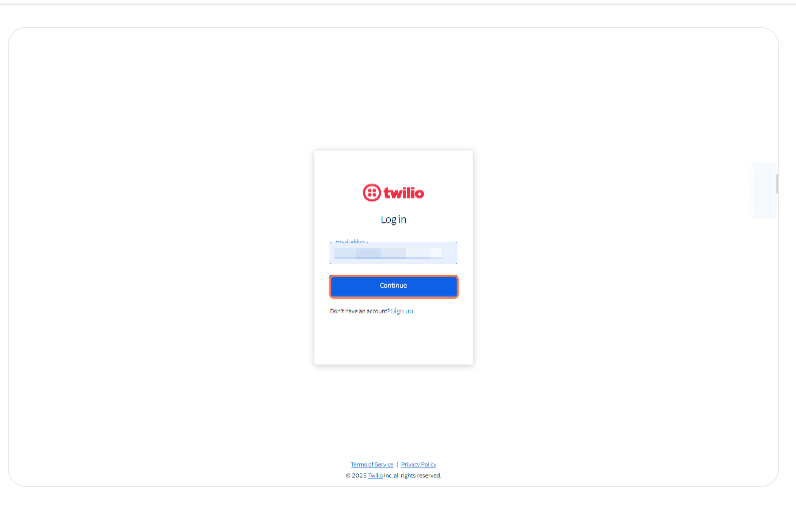
3. Log In to Your Twilio Account
Enter your credentials, and access your dashboard.
✅ Once logged in, you'll land on the Twilio Console homepage.
> ⚠ **Important: Upgrade Your Twilio Account**\
> New Twilio accounts start on a free trial, which may prevent your voice assistant from working properly after deployment.\
> To avoid issues, it's recommended to verify and upgrade your account before proceeding.
***
3. Log In to Your Twilio Account
Enter your credentials, and access your dashboard.
✅ Once logged in, you'll land on the Twilio Console homepage.
> ⚠ **Important: Upgrade Your Twilio Account**\
> New Twilio accounts start on a free trial, which may prevent your voice assistant from working properly after deployment.\
> To avoid issues, it's recommended to verify and upgrade your account before proceeding.
 ***
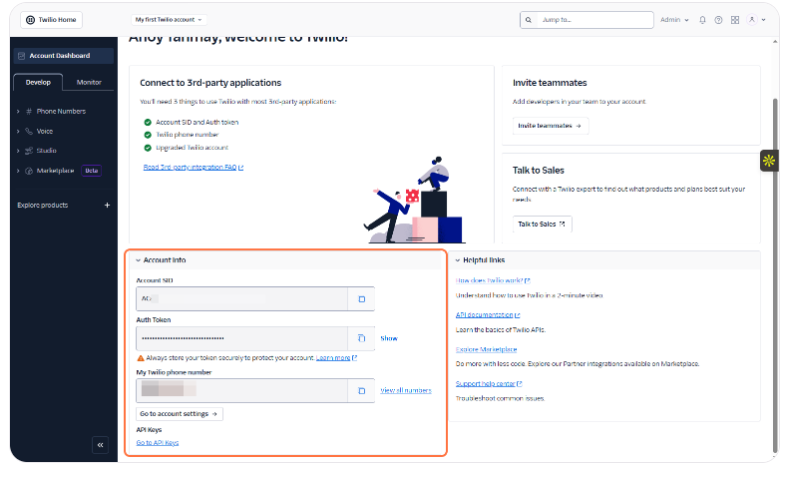
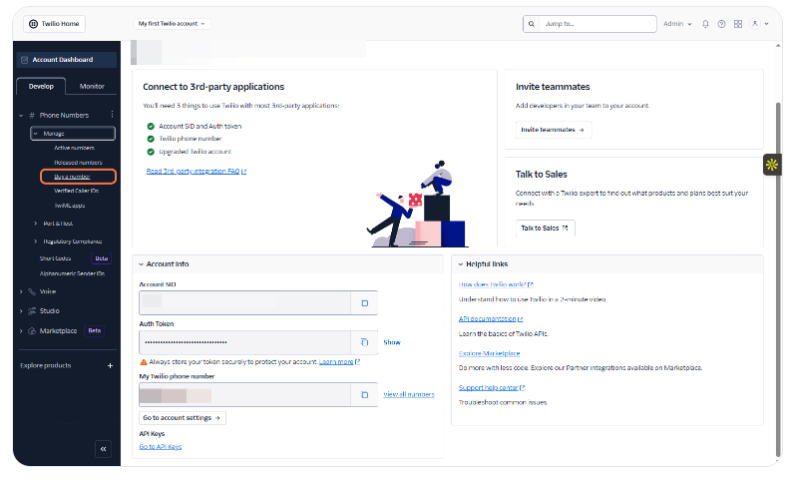
4. Copy Account SID and Auth Token
On the Twilio Console homepage, locate your **Account SID** and **Auth Token**.\
Copy and keep them handy — you'll need these to integrate Twilio with Insighto.
> 🔒 Treat these as sensitive credentials. Don't share them publicly.
***
4. Copy Account SID and Auth Token
On the Twilio Console homepage, locate your **Account SID** and **Auth Token**.\
Copy and keep them handy — you'll need these to integrate Twilio with Insighto.
> 🔒 Treat these as sensitive credentials. Don't share them publicly.
 ***
5. Buy a Twilio Phone Number
Go to the **Phone Numbers** section in your Twilio Console and click **Buy a Number**.\
Use filters to select your country and ensure the number has **Voice** capability.
> 🔁 Already have a number? Refer to this guide to **Port your existing number on Twilio**.
***
5. Buy a Twilio Phone Number
Go to the **Phone Numbers** section in your Twilio Console and click **Buy a Number**.\
Use filters to select your country and ensure the number has **Voice** capability.
> 🔁 Already have a number? Refer to this guide to **Port your existing number on Twilio**.
 ***
✅ **Twilio Setup Complete — Final Checks Before Integration**
***
## Twilio integration with Insighto.ai
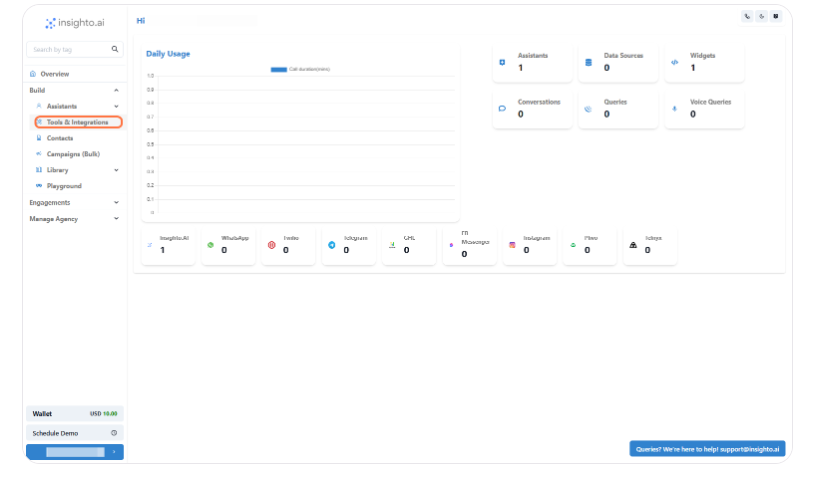
6. Click on Tools & Integrations
Click on **Tools & Integrations**
***
✅ **Twilio Setup Complete — Final Checks Before Integration**
***
## Twilio integration with Insighto.ai
6. Click on Tools & Integrations
Click on **Tools & Integrations**
 ***
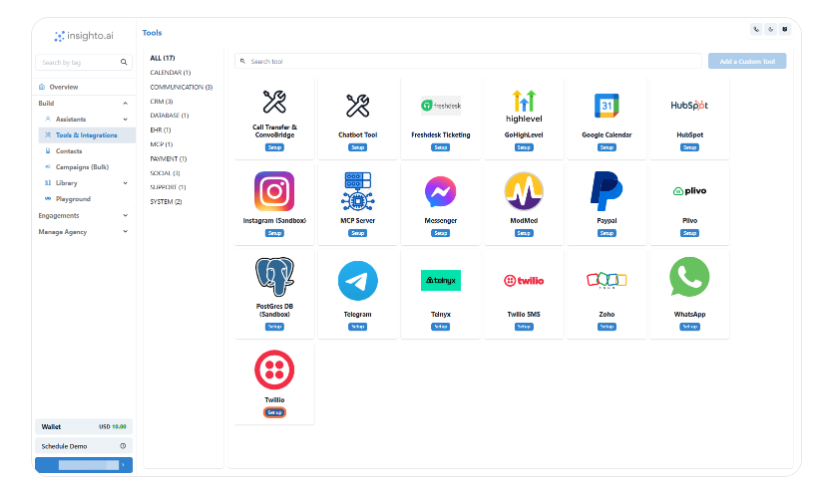
7. Click on Twilio Set up
Click on **Twilio Set up**
***
7. Click on Twilio Set up
Click on **Twilio Set up**
 ***
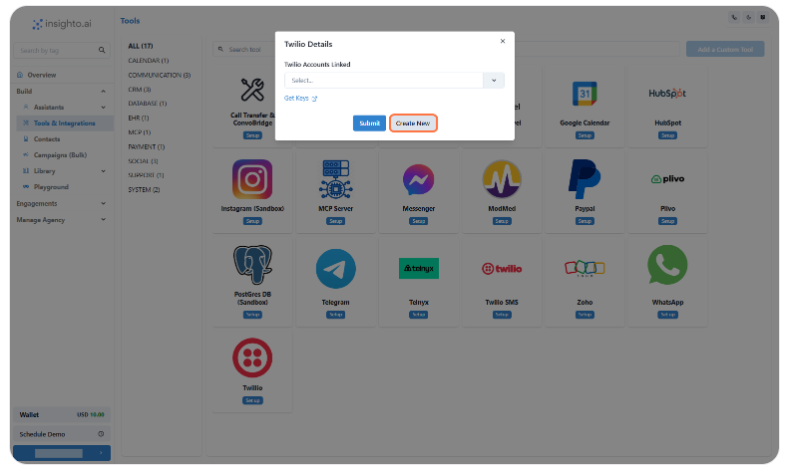
8. Click on Create New
Click on **Create New**
***
8. Click on Create New
Click on **Create New**
 ***
9. Click on Submit
* Provide a Name
* Input your **Account SID** and **Auth Token**
* Click on **Submit**
***
🔗 **Twilio Integration Complete**\
Your Twilio account is now successfully connected to Insighto.\
Let's move on to the final step — deploying your voice assistant on the Twilio number.
***
## Twilio Widget Set Up Process
10. Click on Widgets
Click on **Widgets**
***
9. Click on Submit
* Provide a Name
* Input your **Account SID** and **Auth Token**
* Click on **Submit**
***
🔗 **Twilio Integration Complete**\
Your Twilio account is now successfully connected to Insighto.\
Let's move on to the final step — deploying your voice assistant on the Twilio number.
***
## Twilio Widget Set Up Process
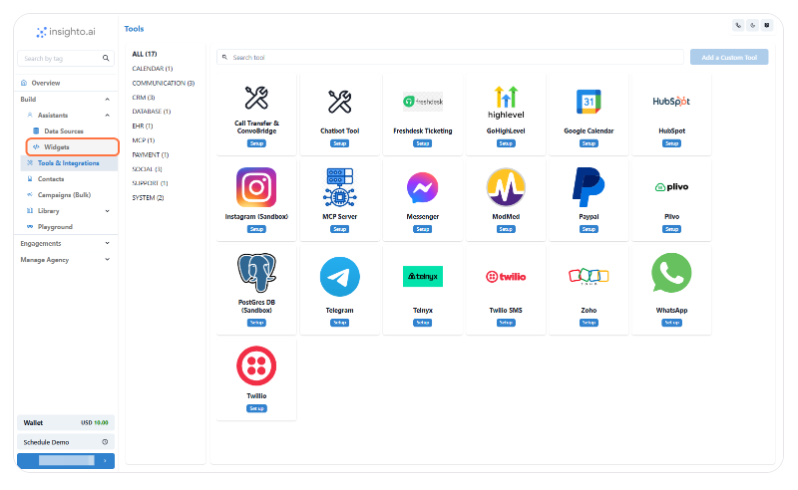
10. Click on Widgets
Click on **Widgets**
 ***
11. Click on Create Widget
Click on **Create Widget**
***
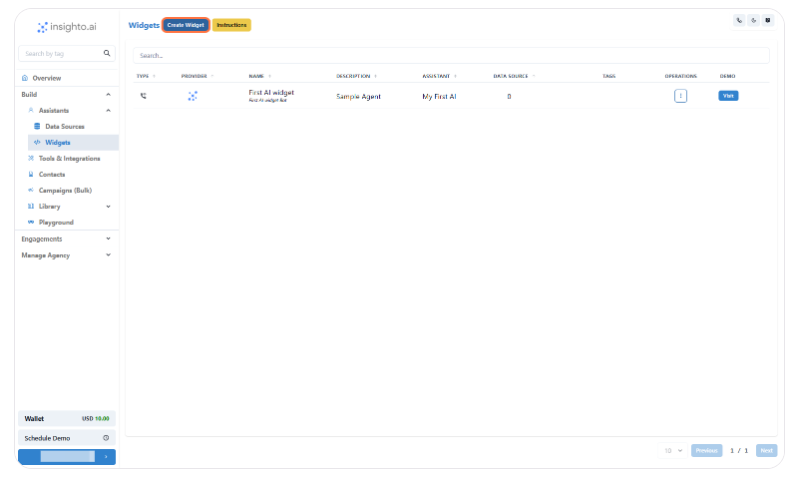
11. Click on Create Widget
Click on **Create Widget**
 ***
12. Select Provider Type
Select **Provider Type**
***
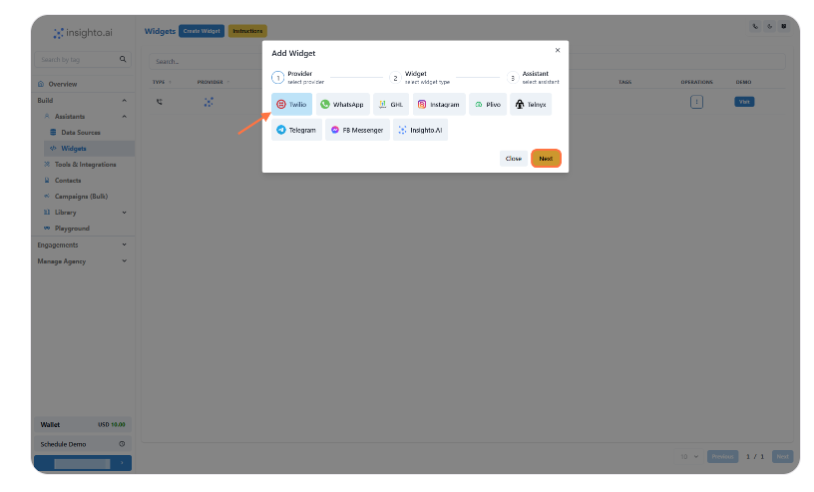
12. Select Provider Type
Select **Provider Type**
 ***
13. Select Widget Type
* Select the **Widget Type** as shown below
* Provide **Name** & **Description** of the Widget
* Click on **Next**
***
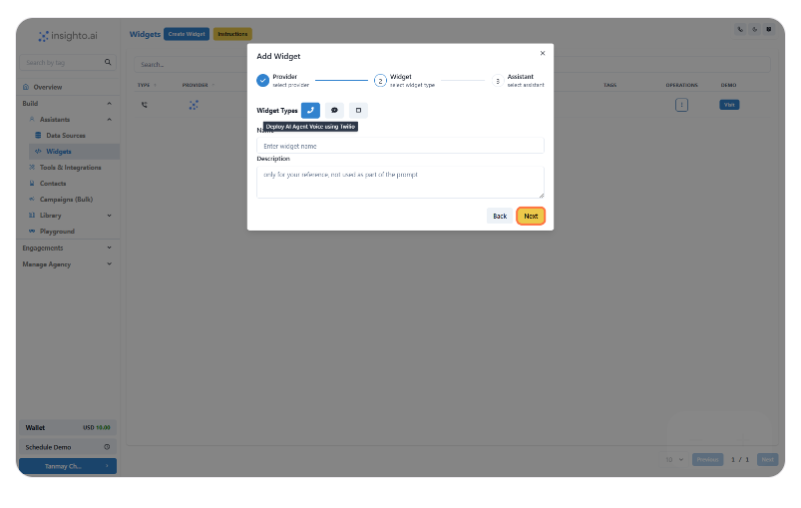
13. Select Widget Type
* Select the **Widget Type** as shown below
* Provide **Name** & **Description** of the Widget
* Click on **Next**
 ***
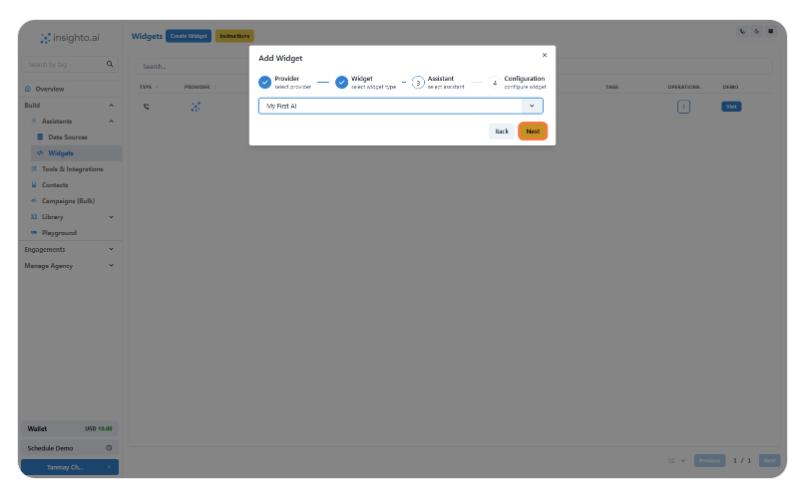
14. Select the Assistant
Select the **Assistant** from the dropdown and proceed
***
14. Select the Assistant
Select the **Assistant** from the dropdown and proceed
 ***
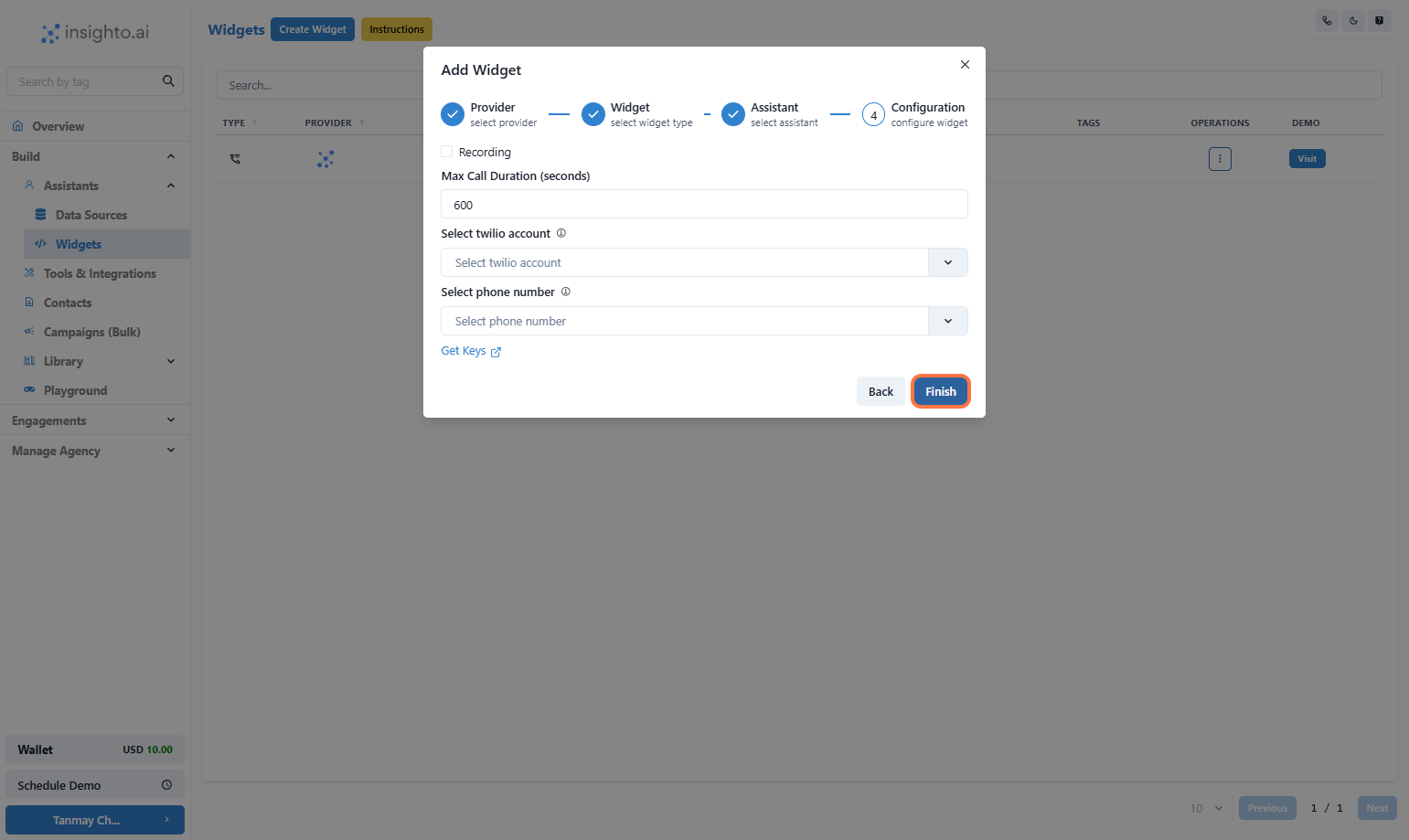
15. Configure Twilio Widget
In this step, set the behavior for your Twilio-powered voice assistant:
* Enable Call Recording (optional) – Recordings will be available in your Twilio dashboard
* Set Maximum Call Duration in seconds (e.g., 300 for 5 minutes)
* Select Your **Twilio Account** from the dropdown
* Choose a **Phone Number** associated with that account
Once done, click **Finish** to complete deployment.
***
15. Configure Twilio Widget
In this step, set the behavior for your Twilio-powered voice assistant:
* Enable Call Recording (optional) – Recordings will be available in your Twilio dashboard
* Set Maximum Call Duration in seconds (e.g., 300 for 5 minutes)
* Select Your **Twilio Account** from the dropdown
* Choose a **Phone Number** associated with that account
Once done, click **Finish** to complete deployment.
 ***
16. Test Your Voice Assistant
Call the Twilio number you just configured to test your AI voice assistant in action.\
Make sure the conversation flows as expected based on your prompt and voice settings.
***
# 🛠️ Troubleshooting Tips
If your voice assistant isn’t working as expected, refer to the following checks:
| Issue | What to Do |
| --------------------------- | --------------------------------------------------------------------------------------------------------------- |
| System Logs | Go to the bottom-left of your Insighto dashboard → click your name → select System Logs to view error messages. |
| Twilio Account Not Upgraded | Ensure your Twilio account is upgraded; trial accounts may block live calls. |
| Voice Routing Region | Confirm that your Twilio number's Voice routing is set to US1. |
| Invalid Auth Token or SID | Double-check that your Twilio Auth Token and SID entered in Insighto are correct. |
| Call Diagnostics | Check call recordings and call status inside your Twilio console. |
***
16. Test Your Voice Assistant
Call the Twilio number you just configured to test your AI voice assistant in action.\
Make sure the conversation flows as expected based on your prompt and voice settings.
***
# 🛠️ Troubleshooting Tips
If your voice assistant isn’t working as expected, refer to the following checks:
| Issue | What to Do |
| --------------------------- | --------------------------------------------------------------------------------------------------------------- |
| System Logs | Go to the bottom-left of your Insighto dashboard → click your name → select System Logs to view error messages. |
| Twilio Account Not Upgraded | Ensure your Twilio account is upgraded; trial accounts may block live calls. |
| Voice Routing Region | Confirm that your Twilio number's Voice routing is set to US1. |
| Invalid Auth Token or SID | Double-check that your Twilio Auth Token and SID entered in Insighto are correct. |
| Call Diagnostics | Check call recordings and call status inside your Twilio console. |